 msg1 msg2 msg3
Browsing guide
How to browse the official website of the Ministry.
The Ministry offers the public an Internet portal which provides access to the information and services offered by this Department. This Browsing Guide displays the information structure on the portal, the accessibility criteria and standards that it meets and the technical recommendations and programmes required to obtain the information and access the services on offer. The home page of the portal is structured in to a number of sections:

- Homepage and browsing/results page header.
- Upper margin of web site Shows the institutional coat of arms of the Ministry; by clicking on it, you can go back to the home page at any time.
- To view the web version in a language other than Spanish (default language), click on the word "Welcome" in the corresponding language of your choice (Spanish: Bienvenido; Catalan: Benvinguts, Galician: Benvidos, Basque: Ongi Etorri and English: Welcome), links of interest that point both to other websites associated to this Ministry and to links to other ministries or institutions of interest, Contact Us and Web Map.
- Access to the social media in which the Ministry participates.
- Information and service channels: Upper navigation bar of the portal. Provides information on the Ministry, the services it offers and its main areas of activity.

- Central content area: In the centre of the home page you will find the important news items as well as the latest news from the Ministry.
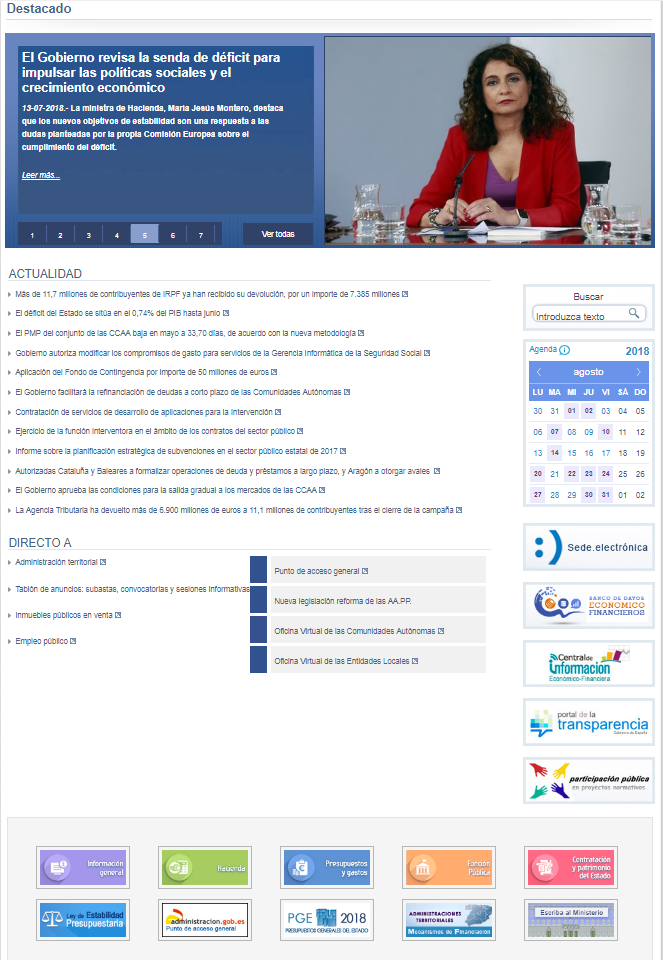
- Direct access to: Includes a direct access to the web pages or web sitse most used by citizens.
- Right banners: advanced browser, the Ministry's Agenda and a series of banner links to other websites.
- Lower banners: direct access to the shown web page.
- Complementary menu area: At the foot of the page including information referred to the Browsing Guide, Help Us Improve (quality survey), User Log In, Legal Notice and Accessibility.

Where to find us?Through the header found at the top of the content on the navigation/results pages of the website. Identifies the information content being accessed via the channel, sub-channel and subject.
Also, at all times it is possible to navigate using the website map, situated in the peripheral area of the home and navigation page.
Accessibility and Standards
The portal of the Ministry is fully accessible to the disabled="disabled" in accordance with the WAI 1 (AA) and W3 standards
.
The portal fulfils the W3C recommendations concerning HTML 4.0 and CSS specifications.
 El The Ministry provides an automated service for owners of content that has been added to the website. The portal's RSS service will instantly inform you about the news stories that occur in certain sections:
- Ministry Civil Service and Employment Entrance Examinations
- Press releases from the Ministry
- News of the Virtual Office of the Locals Agencies
- Civil Service and Employment Opportunities at the Ministry
Technical recommendations and programmes needed for downloading information from the portal
The programmes needed for viewing some documents on the portal are:
-
 for viewing pdf. files.
 - Certificate electronic X509.3 de Class 2, issued by the Spanish National Mint, for processing some electronic services.
- RSS readers, which allow you to group information from different websites on a single page, among others: Feedreader, Sharp Reader o Feed Demon.
Highlighted banners
Links to important information of the Ministry of Finance and Civil Service





Ministry of Finance and Civil Service
Page update date:19/07/2022


